Kubernetes HAMi
1. Kubernetes HAMi
HAMi (Heterogeneous AI Computing Virtualization Middleware) is a Middleware that virtualizes AI Accelerators such as GPUs and NPUs in a Kubernetes environment so that one Accelerator can be shared by multiple Pods. HAMi provides Memory size limits and compute Core utilization limits on top of the Kubernetes Device Plugin approach, so that one Accelerator can be shared and allocated to multiple Pods.
| Stage | Limitation of the Device Plugin approach | HAMi’s solution |
|---|---|---|
| Resource Request | Accelerators are handled only as integer-count Resources, so Memory size or Core utilization cannot be requested. | Registers an inflated Accelerator count, and Memory size and Core utilization are requested as separate Resources. |
| Node Selection | kube-scheduler knows only the Accelerator count per Node and cannot know the remaining Memory size and Core utilization of each Accelerator. | HAMi Device Plugin records the detailed Accelerator information in a Node Annotation, and HAMi Scheduler refers to it. |
| Accelerator Selection | Which Accelerator to allocate is decided by kubelet based on Device IDs after the Pod is bound to a Node, so there is no guarantee that an Accelerator satisfying the Memory size and Core utilization requested by the Pod is selected. | HAMi Scheduler selects the Node and the Accelerator together and delivers the result to HAMi Device Plugin through Pod Annotations. |
| Accelerator Usage | Even when an Accelerator is shared, there is no means to limit the usage of each Pod. | The isolation layer enforces the Memory size and Core utilization limits. |
However, since the Device Plugin specification only allows limited information such as the ID and Health state of a Device to be exchanged and cannot be extended directly, HAMi follows the Device Plugin specification as it is and works around its constraints. [Table 1] shows the limitations of sharing Accelerators with the Kubernetes Device Plugin approach and HAMi’s solutions. HAMi solves these limitations with a structure in which HAMi Scheduler also performs Accelerator selection and delivers the result to HAMi Device Plugin through Annotations, and with the isolation layer.
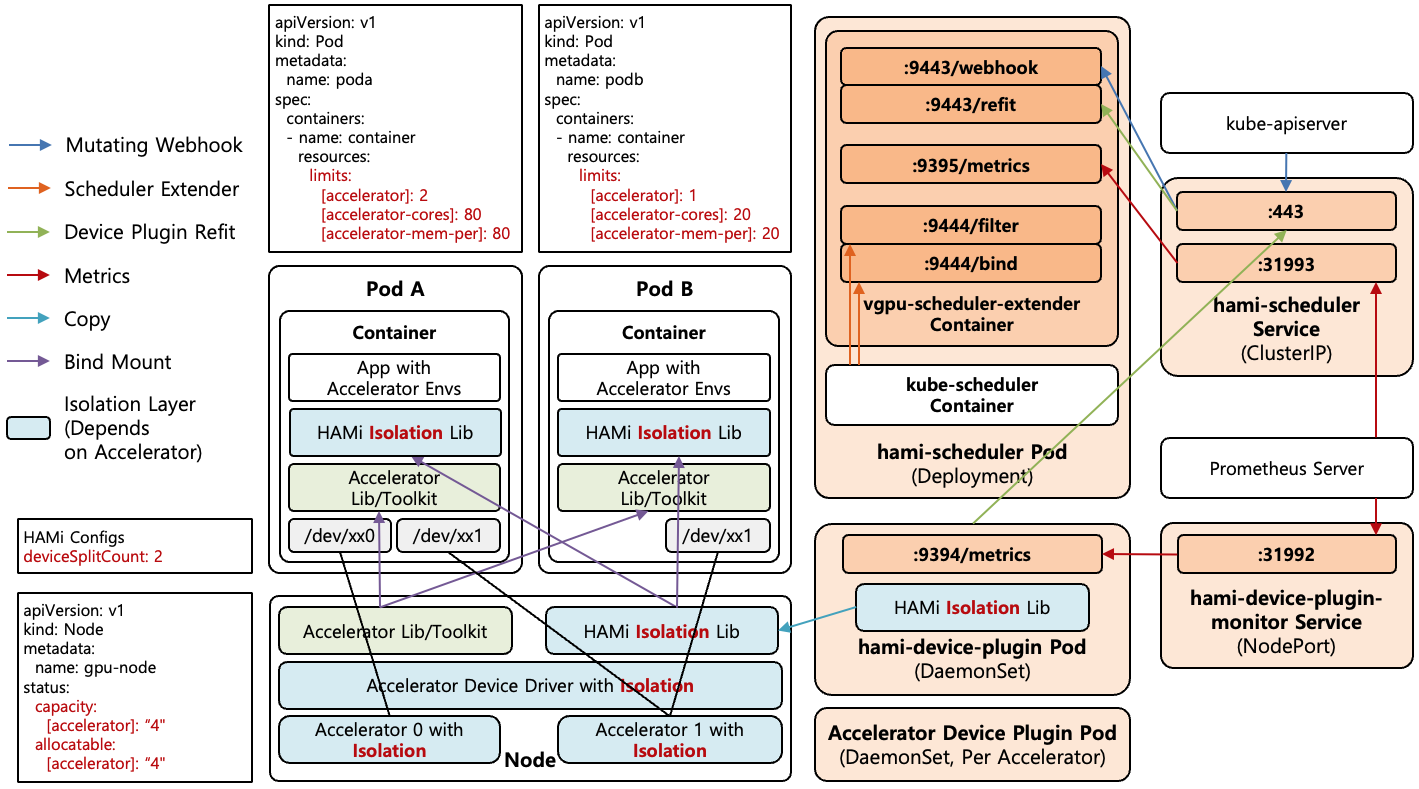
[Figure 1] HAMi Architecture
[Figure 1] shows the Architecture of HAMi. HAMi’s components and Monitoring are as follows.
- HAMi Scheduler : Runs through the
hami-schedulerDeployment, and the kube-scheduler Container and the Scheduler Extender Container run together in one Pod. As in the Scheduler Extender path of [Figure 1], kube-scheduler calls the Scheduler Extender in the same Pod through Loopback (9444Port). The Scheduler Extender also provides the Mutating Webhook that changes the Scheduler of Pods requesting Accelerators to HAMi Scheduler, and as in the Mutating Webhook path of [Figure 1], kube-apiserver calls it through thehami-schedulerService. All kinds of Accelerators share one HAMi Scheduler, and the Scheduling behavior for each Accelerator is implemented in per-Accelerator Packages inside HAMi Scheduler. - HAMi Device Plugin : Runs on Nodes with Accelerators through the
hami-device-pluginDaemonSet, and registers Accelerators with kubelet, checks the Health state of Accelerators, and allocates Accelerators to Containers. When it cannot allocate the Accelerators selected by HAMi Scheduler because of NUMA alignment, it asks HAMi Scheduler to re-select Accelerators, as in the Device Plugin Refit path of [Figure 1]. - Isolation Layer : The layer that enforces that shared Accelerators are not used beyond their limits. The method in which HAMi Scheduler records the selected Device and limit values in Pod Annotations and HAMi Device Plugin refers to them for allocation is called the HAMi Protocol, and isolation is classified into the following three levels. The closer the layer is to Hardware, the stronger the isolation but the less flexible the partitioning.
- Library-level Isolation : The isolation Library injected into the Container intercepts Accelerator API calls in user space and limits Memory allocation and Core usage. Since the limit is applied at API call time, Memory size and Core utilization can be specified as arbitrary values. The isolation Library is installed on the Node through the Copy in [Figure 1] when HAMi Device Plugin starts, and is delivered to the Container through the Bind Mount in [Figure 1] when an Accelerator is allocated to a Pod.
- Driver-level Isolation : While the hardware itself is shared, the Accelerator Driver tracks and enforces the Memory quota and Core utilization of each Pod. Since the Driver, not the Application, enforces the limits, no separate Library injection is needed, and multiple Instances with quotas can run on one physical Accelerator.
- Hardware-level Isolation : The hardware itself is physically partitioned, creating virtual Accelerators in which each Partition has independent Memory and Cores. The possible configurations are limited to the set of Templates (fixed Memory and Core combinations) predefined by the vendor for each Chip, and one of these Templates is allocated to a Pod. The isolation is the most reliable, but partitioning finer than the Templates is not possible.
- Monitoring : As in the Metrics path of [Figure 1], HAMi Scheduler provides the per-Accelerator and per-Pod allocation history on the
9395Port, and thevgpu-monitorContainer of HAMi Device Plugin provides the GPU state and the actual GPU usage of each Container on the9394Port, as Prometheus Metrics. Since thevgpu-monitorContainer is included only in the HAMi Device Plugin for NVIDIA GPU, the actual usage Metrics are provided only for NVIDIA GPU.
The Node in [Figure 1] has 2 physical Accelerators, and since the split count (deviceSplitCount) in the HAMi settings is set to 2, 4 Accelerators are registered in the Allocatable/Capacity of the Node. That is, one physical Accelerator can be shared by up to 2 Containers. Pod A requests 2 Accelerators with 80% Core utilization and Memory, and Pod B requests 1 Accelerator with 20% Core utilization and Memory, so Accelerator 1 is shared by Pod A and Pod B.
| Accelerator | Accelerator Resource Name | Memory / Core Limit | Isolation Layer | Device Plugin |
|---|---|---|---|---|
| NVIDIA GPU | nvidia.com/gpu, nvidia.com/gpumem, nvidia.com/gpucores | O / O | Library, Hardware | HAMi Included |
| Huawei Ascend NPU | huawei.com/Ascend910B3, huawei.com/Ascend910B3-memory | O / O | Hardware | HAMi Separate |
| Kunlunxin XPU | kunlunxin.com/vxpu, kunlunxin.com/vxpu-memory | O / X | Hardware | HAMi Separate |
| AMD GPU | amd.com/gpu, amd.com/gpumem, amd.com/gpucores | O / O | Library | HAMi Separate |
[Table 2] shows major Accelerators with Device Plugins that follow the HAMi Protocol, along with their Accelerator Resource names, isolation layers, and Device Plugin packaging. An Accelerator Resource name is the name of the Kubernetes Extended Resource used when a Pod requests an Accelerator in resources, and each Accelerator provides a Resource for requesting the count along with Resources for requesting Memory size and Core utilization. Among them, the Resource for requesting the count (e.g., nvidia.com/gpu) appears in the Node’s Allocatable because HAMi Device Plugin registers it with kubelet, but the Resources for requesting Memory size and Core utilization are not registered on the Node and are recognized and used for Scheduling only by HAMi Scheduler.
HAMi Scheduler operates based on the per-Accelerator Resource names defined in the hami-scheduler-device ConfigMap. The Mutating Webhook uses these names to identify Pods requesting Accelerators, and the Scheduler Extender reads the count, Memory size, and Core utilization requested by the Pod to select Accelerators. Device Plugins are deployed in two ways, HAMi Included (included by default in the HAMi Helm Chart) and HAMi Separate (a separate Chart or Manifest in the Project-HAMi repository), and except for NVIDIA GPU, each Device Plugin must be installed separately from the HAMi installation.
| Accelerator | Accelerator Resource Name | Memory / Core Limit | Isolation Layer |
|---|---|---|---|
| Cambricon MLU | cambricon.com/vmlu, cambricon.com/mlu.smlu.vmemory, cambricon.com/mlu.smlu.vcore | O / O | Driver |
| Hygon HCU | hygon.com/hcunum, hygon.com/hcumem, hygon.com/hcucores | O / O | Driver |
| Iluvatar GPU | iluvatar.ai/MR-V100-vgpu, iluvatar.ai/MR-V100.vMem, iluvatar.ai/MR-V100.vCore | O / O | Library |
| Moore Threads GPU | mthreads.com/vgpu, mthreads.com/sgpu-memory, mthreads.com/sgpu-core | O / O | Driver |
| MetaX GPU | metax-tech.com/sgpu, metax-tech.com/vmemory, metax-tech.com/vcore | O / O | Driver |
| AWS Neuron | aws.amazon.com/neuron, aws.amazon.com/neuroncore | X / O | Hardware |
[Table 3] shows major Accelerators that HAMi supports by using vendor-provided Device Plugins as they are. As of HAMi 2.11.0, a total of 13 kinds of Accelerator settings, including the Accelerators in [Table 2] and [Table 3], are defined in the hami-scheduler-device ConfigMap. The Resource names in [Table 3] are all names registered with kubelet by the vendor Device Plugins themselves, and HAMi only registers these names in the hami-scheduler-device ConfigMap so that the Mutating Webhook and the Scheduler Extender can recognize the Pod’s requests.
When a vendor Device Plugin is used, the vendor Plugin is responsible for both Device selection and isolation, so HAMi is involved only in Scheduling. Most isolation layers are at the Driver level handled by the Accelerator Driver, and some also use vendor Library injection (Library level) or Hardware partitioning (Hardware level). In this case, the value HAMi provides is limited to specifying Scheduling policies based on Pod Annotations and operating multiple vendors with one Scheduler, and the core value of HAMi appears when the HAMi Protocol is used.
$ kubectl -n kube-system get configmap hami-scheduler-device -o jsonpath='{.data.device-config\.yaml}'
nvidia:
  resourceCountName: nvidia.com/gpu
  resourceMemoryName: nvidia.com/gpumem
  resourceMemoryPercentageName: nvidia.com/gpumem-percentage
  resourceCoreName: nvidia.com/gpucores
  resourcePriorityName: nvidia.com/priority
  ...
  deviceSplitCount: 10
  deviceMemoryScaling: 1
  deviceCoreScaling: 1
  ...
cambricon:
  resourceCountName: cambricon.com/vmlu
  resourceMemoryName: cambricon.com/mlu.smlu.vmemory
  resourceCoreName: cambricon.com/mlu.smlu.vcore
hygon:
  resourceCountName: hygon.com/hcunum
  resourceMemoryName: hygon.com/hcumem
  resourceCoreName: hygon.com/hcucores
  memoryFactor: 1
...
[Shell 1] shows the per-Accelerator Resource name settings defined in the hami-scheduler-device ConfigMap. Under each Accelerator Section (nvidia, cambricon, hygon, etc.), the count, Memory, and Core Resource names are defined, and this setting unifies the Resource names that HAMi Device Plugin registers with kubelet and the Resource names that the Scheduler Extender recognizes in Pod requests. In addition to Resource names, each Section also contains per-Accelerator settings such as the split count of one physical Accelerator, and the setting items differ for each Accelerator.
1.1. Accelerator Registration
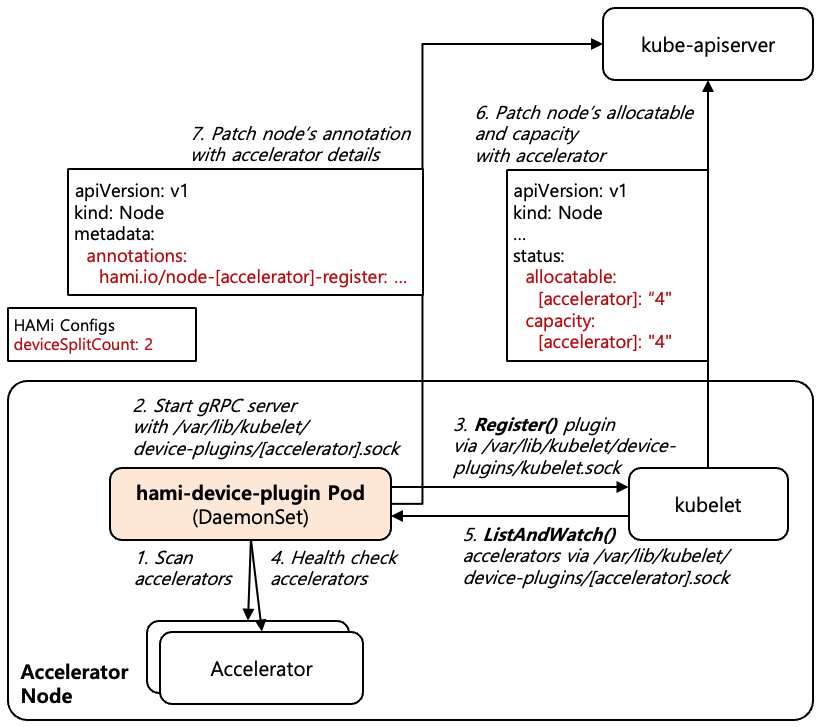
[Figure 2] Accelerator Registration Process
Accelerator registration is performed by HAMi Device Plugin, which inflates the physical Accelerators on the Node by the split count and registers them with Kubernetes. [Figure 2] shows the Accelerator registration process.
- HAMi Device Plugin starts running on the Accelerator Node through the
hami-device-pluginDaemonSet, reads per-Accelerator settings such as the split count (deviceSplitCount), and discovers the Node’s Accelerators to obtain their UUID, Memory size, Core count, and Type. - HAMi Device Plugin creates its own Unix Domain Socket in the
/var/lib/kubelet/device-plugins/Directory and starts the gRPC Server. The Socket file name differs for each Device Plugin, and NVIDIA GPU usesnvidia-gpu.sock. - HAMi Device Plugin sends a
Register()gRPC request through kubelet’s Unix Domain Socket (/var/lib/kubelet/device-plugins/kubelet.sock) to register the Plugin itself with kubelet. The request includes the Resource name and the Socket file name created in step 2. - After registration, HAMi Device Plugin starts checking the Health state of the Accelerators. When it detects a failure, it sends the items inflated from that physical Accelerator back to kubelet in the
Unhealthystate, and also updates thehealthvalue of the Node Annotation so that the Accelerator is excluded from allocation candidates. - kubelet sends a
ListAndWatch()gRPC request to HAMi Device Plugin through the received Socket and receives the Accelerator list. At this time, HAMi Device Plugin inflates the number of physical Accelerators by a multiple of the split count setting (deviceSplitCount). For example, if there are 2 physical Accelerators and the split count is set to 2, 4 Accelerators are delivered, which means one physical Accelerator can be allocated to up to 2 Containers. - kubelet reflects the received Accelerator count in the Node’s Allocatable/Capacity through kube-apiserver.
- Separately from the Device Plugin specification, HAMi Device Plugin records the detailed information of the physical Accelerators in the
hami.io/node-[accelerator]-registerNode Annotation.
Since the kubelet Device Plugin specification can only deliver limited information such as the ID and Health state of a Device, detailed information such as the Accelerator’s Memory size cannot be delivered through the Device Plugin specification. That is, only the Accelerator count is registered in the Node’s Allocatable, and the Accelerator’s Memory size and Core utilization are not. Therefore, HAMi Device Plugin separately records the detailed information in the hami.io/node-[accelerator]-register Node Annotation, and the Scheduler Extender later refers to this Annotation to perform Scheduling. Since the Annotation is updated periodically, changes in the Node’s Accelerator state are also reflected in the Scheduler Extender.
| |
[File 1] shows an example of the hami.io/node-[accelerator]-register family Annotation that HAMi Device Plugin records on a Node during the Accelerator registration process. One Annotation contains the list of physical Accelerators on the Node, and the Accelerator Suffix changes depending on the kind of Accelerator. Most values are recorded as a JSON array, but some Accelerators use a comma-separated string. The items recorded for each physical Accelerator are as shown in [Table 4].
| Item | Meaning | Example Value |
|---|---|---|
id | Unique ID of the physical Accelerator (UUID, etc.) | "GPU-3b71a9c4-..." : GPU UUID assigned by the Driver |
index | Accelerator number within the Node | 0 : first GPU of the Node, 1 : second GPU of the Node |
count | Maximum number of shares of one physical Accelerator | 2 : can be shared by up to 2 Containers |
devmem | Allocatable Memory size (MiB) | 81920 : 80GiB of Memory can be allocated |
devcore | Allocatable Core amount | 100 : up to 100% Core utilization can be allocated |
type | Accelerator model | "NVIDIA A100-SXM4-80GB" : GPU model name |
numa | NUMA Node to which the Accelerator is attached | 1 : attached to NUMA Node 1 |
mode | Operating Mode of the Accelerator | "hami-core" : shared with the isolation Library, "mig" : partitioned into MIG Instances, "enpu" : partitioned into eNPUs of Ascend NPU |
health | Health state of the Accelerator | true : healthy |
The item names in [Table 4] are the same for all Accelerators because HAMi Device Plugins use HAMi’s common structure, but the way values are filled in differs for each Accelerator. For example, for devcore, some Accelerators record Core utilization (%) and others record the actual number of Cores, and numa and mode have meaningful values only for some Accelerators. In the JSON format, items whose value is 0 or empty are omitted.
Accelerators that use vendor Device Plugins ([Table 3]) delegate Accelerator registration to each vendor Device Plugin, and HAMi Scheduler refers to the information registered by the vendor Device Plugin.
1.2. HAMi Scheduler Assignment
Pods requesting Accelerators must be scheduled by HAMi Scheduler, which manages the allocation history of each Accelerator. So that users do not have to specify schedulerName directly for each Pod, HAMi Scheduler’s Mutating Webhook intercepts Pod creation requests and changes the Pod’s Scheduler to HAMi Scheduler.
$ kubectl get mutatingwebhookconfigurations
NAME                                   WEBHOOKS   AGE
hami-webhook                           1          24d
monitoring-kube-prometheus-admission   1          23d

$ kubectl get mutatingwebhookconfigurations hami-webhook -o yaml
...
webhooks:
- name: vgpu.hami.io
  clientConfig:
    service:
      name: hami-scheduler
      namespace: kube-system
      path: /webhook
      port: 443
  rules:
  - apiGroups: [""]
    apiVersions: [v1]
    operations: [CREATE, UPDATE]
    resources: [pods]
  namespaceSelector:
    matchExpressions:
    - key: hami.io/webhook
      operator: NotIn
      values: [ignore]
  objectSelector:
    matchExpressions:
    - key: hami.io/webhook
      operator: NotIn
      values: [ignore]
  failurePolicy: Ignore
  sideEffects: None

$ kubectl -n kube-system get svc hami-scheduler
NAME             TYPE        CLUSTER-IP     EXTERNAL-IP   PORT(S)             AGE
hami-scheduler   ClusterIP   10.97.57.101   <none>        443/TCP,31993/TCP   24d

$ kubectl -n kube-system get endpoints hami-scheduler
NAME             ENDPOINTS                           AGE
hami-scheduler   10.244.0.24:9443,10.244.0.24:9395   24d

$ kubectl -n kube-system get pods -l app.kubernetes.io/component=hami-scheduler -o wide
NAME                              READY   STATUS    RESTARTS   AGE     IP            NODE
hami-scheduler-6d94b4bd6f-dsbg6   2/2     Running   0          3m40s   10.244.0.24   gpu
[Shell 2] shows the Mutating Webhook Configuration (hami-webhook) used in the Mutating Webhook path of [Figure 1] and the hami-scheduler Service that receives Webhook requests. According to rules, Pod creation requests (CREATE) go through the Webhook, and the requests are delivered to the /webhook path (443 Port) of the hami-scheduler Service referenced by clientConfig.service.
The 443 Port of the Service is connected to the 9443 Port of the hami-scheduler Pod, and the Scheduler Extender Container (vgpu-scheduler-extender) in this Pod receives the Webhook requests. The Endpoint (10.244.0.24:9443) also matches the IP of the hami-scheduler-6d94b4bd6f-dsbg6 Pod. The 9395 Port shown together is the Port through which HAMi Scheduler provides Prometheus Metrics via the 31993 Port of the Service, as in the Metrics path of [Figure 1].
For a Pod creation request, the Webhook checks whether the Pod requests at least one of the Accelerator Resources registered in the hami-scheduler-device ConfigMap ([Table 2], [Table 3], etc.), and changes the Pod’s schedulerName to hami-scheduler only if it does. Only Pods whose schedulerName is default-scheduler (including Pods that do not specify schedulerName) are targets of the change, and Pods with another Scheduler specified are left as they are.
1.3. Accelerator Scheduling
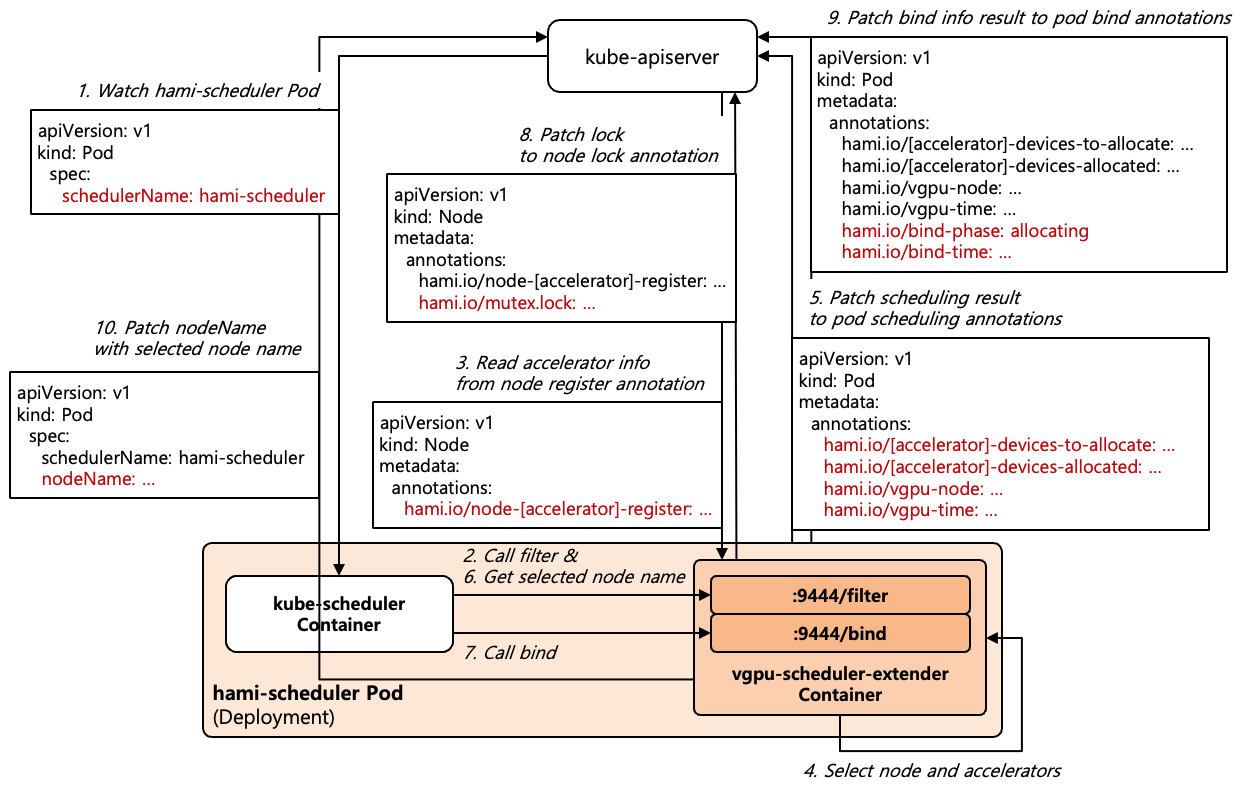
[Figure 3] Accelerator Scheduling Process
[Figure 3] shows the Accelerator Scheduling process and corresponds to the Scheduler Extender path of [Figure 1].
- kube-scheduler inside HAMi Scheduler watches kube-apiserver and fetches Pods whose
schedulerNameishami-scheduleras Scheduling targets. - kube-scheduler calls the Scheduler Extender’s
/filterEndpoint in the Filter phase. - The Scheduler Extender looks up the Accelerator information recorded in the
hami.io/node-[accelerator]-registerAnnotation of each Node. - Based on the looked-up Accelerator information and the existing allocation history, the Scheduler Extender selects Nodes that have Accelerators satisfying the request conditions, calculates scores according to the Scheduling policy, and selects the Node and Accelerators with the highest score.
- The Scheduler Extender records the selection result in Pod Annotations. The UUID, Memory size, and Core utilization limit values of the selected Accelerators are recorded in the
hami.io/[accelerator]-devices-to-allocateandhami.io/[accelerator]-devices-allocatedAnnotations, and the selected Node name and selection time are recorded in thehami.io/vgpu-nodeandhami.io/vgpu-timeAnnotations. - The Scheduler Extender returns only the one selected Node to kube-scheduler in the
/filterresponse. - In the Bind phase, kube-scheduler calls the Scheduler Extender’s
/bindEndpoint with the selected Node name, and the Scheduler Extender checks whether the received Node is the same as the Node selected in the Filter phase. - The Scheduler Extender locks the Node by recording the Pod in the
hami.io/mutex.lockNode Annotation. The Lock is held until HAMi Device Plugin completes the Accelerator allocation of the Pod, so that allocations of other Pods on the same Node do not proceed at the same time. If another Pod’s Lock is already held, Bind fails, and kube-scheduler puts the Pod back into the Scheduling Queue to be scheduled again later. - The Scheduler Extender records the Pod’s
hami.io/bind-phaseAnnotation asallocatingand thehami.io/bind-timeAnnotation as the Bind time. - The Scheduler Extender calls the Binding API of kube-apiserver to set the selected Node name in the Pod’s
spec.nodeName.
| |
| |
[File 2] shows an example of the HAMi Annotations that the Scheduler Extender records on a Pod during Accelerator Scheduling, and [File 3] shows an example of the hami.io/mutex.lock Node Annotation recorded on a Node in the Bind phase. The [accelerator] part of the Pod Annotations differs for each Accelerator (e.g., vgpu for NVIDIA GPU, amd for AMD GPU), and [File 2] shows the state in which Scheduling has completed so that, like Pod A in [Figure 1], 2 Accelerators are allocated with 80% Memory and Core utilization, but the Accelerator allocation has not yet been performed. In the Lock Annotation, the Lock time, the Namespace of the Pod holding the Lock, and the Pod name are recorded separated by commas. The meaning of each Annotation is as follows.
hami.io/[accelerator]-devices-to-allocate: The list of Accelerators not yet allocated to Containers. Right after Scheduling, the same value ashami.io/[accelerator]-devices-allocatedis recorded, and HAMi Device Plugin removes each finished item whenever it allocates to a Container, so it is emptied when the Accelerator allocation process completes.hami.io/[accelerator]-devices-allocated: The Accelerator allocation result finally selected by the Scheduler. The Accelerator information allocated to each Container is recorded, and the information of one Accelerator has theUUID,Type,Memory,Coreformat, where Type is the name HAMi uses to distinguish the kind of Accelerator (e.g.,NVIDIAfor NVIDIA GPU,AMDfor AMD GPU), Memory is the size in MiB, and Core is the utilization in %. The Accelerator information allocated to the same Container is joined with:, and the end of each Container is delimited with;. Container names are not recorded, and each;segment corresponds to the Container order in the Pod spec (Init Containers first, then regular Containers). [File 2] is the case where 2 Accelerators are allocated to one Container.hami.io/vgpu-node: The name of the Node to which the Accelerators are allocated.hami.io/vgpu-time: The time when the Scheduler Extender selected the Node and Accelerators (Unix Epoch Time, in seconds).hami.io/bind-phase: The allocation progress state (allocating,success,failed).hami.io/bind-time: The time when Bind was performed (Unix Epoch Time, in seconds).hami.io/mutex.lock: The Lock state of the Node. The value has theLockTime,Namespace,Podformat, where LockTime is the time when the Scheduler Extender acquired the Lock in the Bind phase, recorded in RFC3339 format with nanoseconds, and Namespace and Pod indicate the Pod holding the Lock. While the Annotation exists, other Pods cannot be bound to the same Node, and HAMi Device Plugin uses this Namespace and Pod name to find the Pod to allocate. When the Accelerator allocation completes, the Annotation is deleted from the Node.
$ kubectl -n kube-system get configmap hami-scheduler -o jsonpath='{.data.config\.yaml}'
apiVersion: kubescheduler.config.k8s.io/v1
kind: KubeSchedulerConfiguration
leaderElection:
  leaderElect: true
  resourceName: "hami-scheduler"
  resourceNamespace: "kube-system"
profiles:
- schedulerName: hami-scheduler           # Schedules only Pods with schedulerName: hami-scheduler
extenders:
- urlPrefix: "https://127.0.0.1:9444"     # Scheduler Extender endpoint (loopback only)
  enableHTTPS: true
  tlsConfig:
    insecure: true
  filterVerb: filter                      # Calls /filter in the Filter phase
  bindVerb: bind                          # Calls /bind in the Bind phase
  nodeCacheCapable: true
  weight: 1
  httpTimeout: 30s
  managedResources:                       # Accelerator Resources handled by the Extender
  - ignoredByScheduler: true              # Not counted by NodeResourcesFit
    name: nvidia.com/gpu
  - ignoredByScheduler: true
    name: nvidia.com/gpumem
  - ignoredByScheduler: true
    name: nvidia.com/gpucores
  - ignoredByScheduler: true
    name: nvidia.com/gpumem-percentage
  - ignoredByScheduler: true
    name: nvidia.com/priority
  - ignoredByScheduler: true
    name: cambricon.com/vmlu
  - ignoredByScheduler: true
    name: hygon.com/hcunum
  ...
[Shell 3] shows the KubeSchedulerConfiguration stored in the hami-scheduler ConfigMap. profiles[0].schedulerName: hami-scheduler specifies that kube-scheduler inside HAMi Scheduler schedules only Pods whose schedulerName is hami-scheduler, and this is exactly the name to which the Mutating Webhook changes the Pod’s schedulerName. The Scheduler Extender is registered in extenders. urlPrefix: https://127.0.0.1:9444 is the access point of the Scheduler Extender, and since kube-scheduler and the Extender run as Sidecar Containers in the same Pod, it is called through Loopback. Since the Extender’s /filter and /bind paths do not authenticate callers, they are provided only on a Loopback-only Port (9444) separate from the Webhook Port (9443) exposed through the Service.
filterVerb and bindVerb specify that the Extender is called in the Filter and Bind phases of the Scheduler Framework. The kube-scheduler Extender settings also include prioritizeVerb, which delegates Node scoring, and preemptVerb, which delegates Preemption decisions, but HAMi does not use them. prioritizeVerb is not needed because the Scheduler Extender already calculates scores according to the Scheduling policy in the Filter phase and leaves only the single most suitable Node. Since preemptVerb is not set, kube-scheduler’s Preemption is performed without the Scheduler Extender’s judgment.
The Accelerator Resources managed by the Scheduler Extender are registered in managedResources. By default, kube-scheduler compares the Resources requested by a Pod with the Node’s Allocatable in the NodeResourcesFit Filter Plugin and filters out Nodes with insufficient Resources. However, the Resources requesting the Accelerator’s Memory size and Core utilization are not registered in the Node’s Allocatable, so if kube-scheduler compared them as they are, all Nodes would be rejected for insufficient Resources. Therefore, ignoredByScheduler: true makes kube-scheduler skip comparing these Resources, and checking the Accelerator’s available capacity is handled by the Scheduler Extender, which knows the per-Accelerator allocation history.
1.3.1. Scheduling Policy
| |
[File 4] shows the Annotations that specify the Scheduling policy per Pod. The Scheduling policy is divided into the Node Scheduling Policy, which selects the Node, and the Device Scheduling Policy, which selects the Accelerator within the Node. The binpack policy minimizes Accelerator fragmentation by packing allocations onto Nodes or Accelerators that already have a large allocation, and the spread policy distributes allocations evenly across Nodes or Accelerators. The default policy is set through Helm settings, and specifying these Annotations on a Pod applies a different policy only to that Pod. The meaning of each Annotation is as follows.
hami.io/node-scheduler-policy: The Node Scheduling Policy of the Pod. Specifybinpackorspread, and the default value of the Helm settings isbinpack.hami.io/gpu-scheduler-policy: The Device Scheduling Policy of the Pod. Specify a value supported by each Accelerator such asbinpackorspread, and the default value of the Helm settings isspread.
The default combination of the binpack Node Scheduling Policy and the spread Device Scheduling Policy packs Workloads onto as few Nodes as possible to reduce Node fragmentation, while using Accelerators evenly within a Node so that no Hot-spot forms on an individual Accelerator. Since v2.10.0, multiple policies can be joined with commas in the hami.io/gpu-scheduler-policy Annotation and applied together.
The Scheduler Extender calculates scores for each Node and Accelerator based on how much of the available capacity the Memory and Cores requested by the Pod occupy. The binpack policy gives extra points to the side whose utilization becomes higher after allocation, packing Workloads and reducing the number of Nodes or Accelerators in use, whereas the spread policy conversely gives extra points to the side whose utilization stays lower, distributing Workloads.
1.4. Accelerator Allocation
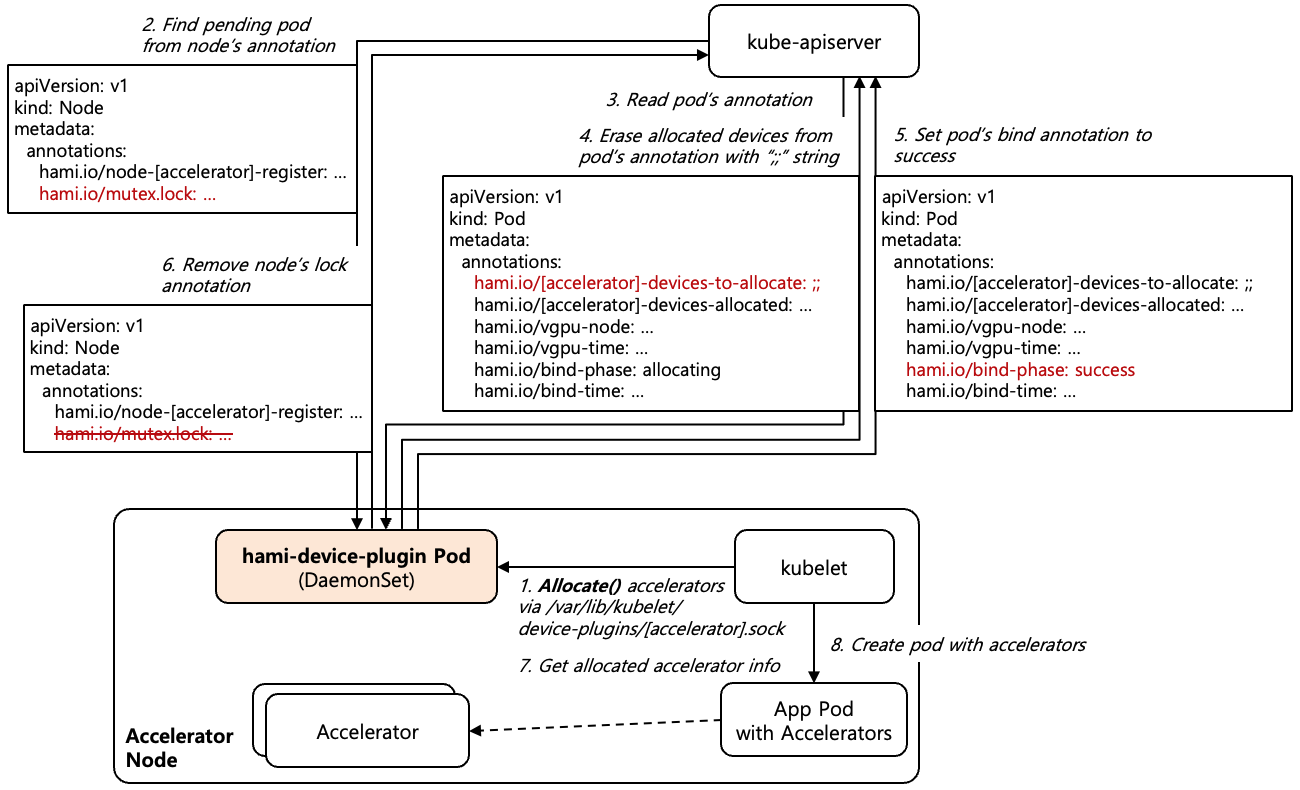
[Figure 4] Accelerator Allocation Process
Accelerator allocation is also performed by HAMi Device Plugin, which actually allocates the Accelerators selected by HAMi Scheduler to Containers. [Figure 4] shows the Accelerator allocation process.
- kubelet on the Node to which the Pod is bound sends an
Allocate()gRPC request to HAMi Device Plugin. - HAMi Device Plugin determines the Pod recorded in the
hami.io/mutex.lockNode Annotation as the Pod to allocate. This is because theAllocate()request contains only Device IDs and no Pod information. - HAMi Device Plugin looks up the Pod’s
hami.io/[accelerator]-devices-to-allocateAnnotation to obtain the UUID, Memory size, and Core utilization limit values of the Accelerators selected by HAMi Scheduler. A typical Device Plugin operates only with the Device IDs contained in theAllocate()request, but HAMi Device Plugin refers to the Pod’s Annotation because it must follow HAMi Scheduler’s Accelerator selection result as it is. - HAMi Device Plugin removes the items of Containers whose allocation is finished from the
hami.io/[accelerator]-devices-to-allocateAnnotation. When all items are removed, only Container delimiters such as;;remain in the Annotation. - When all items are removed, HAMi Device Plugin changes the Pod’s
hami.io/bind-phaseAnnotation tosuccess. - HAMi Device Plugin releases the Node’s Lock by deleting the
hami.io/mutex.lockNode Annotation. - HAMi Device Plugin returns the Accelerator information to allocate and the isolation settings in the
Allocate()response. The returned content differs depending on the isolation layer: at the Library level, isolation Library Mounts and limit value environment variables are returned, and at the Driver/Hardware level, references to virtualized Accelerator Devices are returned. - kubelet applies the returned settings to the Pod’s Containers and creates the Pod, and afterward, when the Container uses the Accelerator, the isolation layer enforces the Memory size and Core utilization limits.
In Library-level Isolation, HAMi Device Plugin specifies the Host path and the Container path of the isolation Library, installed in the Node’s Host Directory through the Copy process in [Figure 1], in the Mount items of the Allocate() response, and kubelet passes these items to the Container Runtime so that the Bind Mount in [Figure 1] is performed when the Container is created. That is, HAMi Device Plugin does not perform the Mount directly but only specifies the Mount targets. In contrast, the delivery method of the Accelerator Driver Library differs for each Accelerator, and it is either injected by the vendor’s Container Runtime extension or delivered by HAMi Device Plugin through the same Mount items.
1.4.1. NUMA Refit
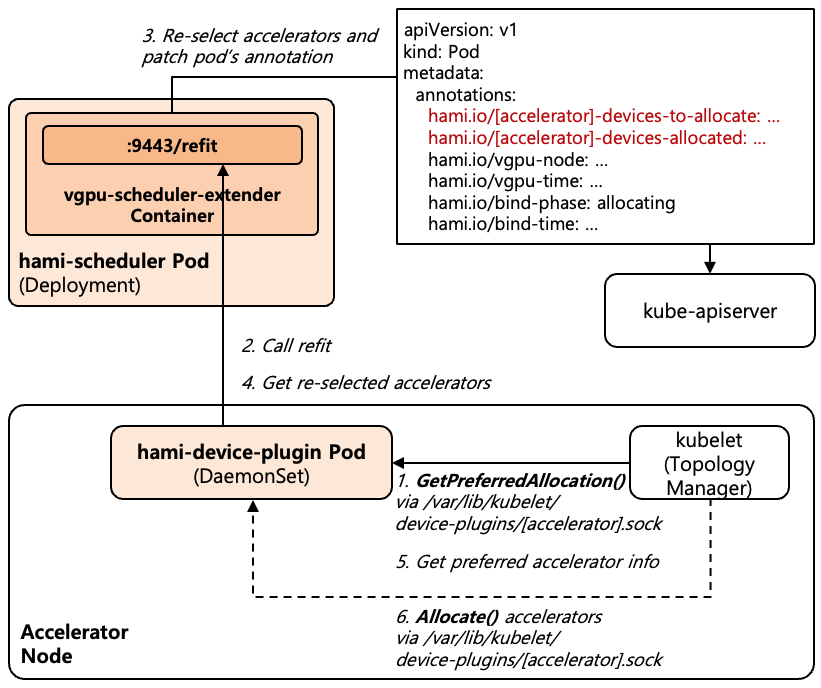
[Figure 5] NUMA Refit Process
When a policy such as single-numa-node is set, kubelet’s Topology Manager restricts the range of Accelerators available for allocation in order to place CPUs and Accelerators on the same NUMA Node. With the static policy, kubelet’s CPU Manager exclusively allocates CPUs of a specific NUMA Node to Containers that are Guaranteed QoS and request integer CPUs, and these CPUs are decided by kubelet based on the Node state after the Pod is bound to the Node and are not exposed to kube-apiserver. Therefore, HAMi Scheduler cannot know at Scheduling time which NUMA Node the Pod’s CPUs will be placed on, and a situation can occur in which the Accelerators recorded by HAMi Scheduler in the Pod Annotation are not within the range allowed by the Topology Manager.
NUMA Refit is a feature in which, in this case, HAMi Device Plugin asks HAMi Scheduler to re-select Accelerators within the allowed range. It was added in HAMi 2.11.0, currently supports only NVIDIA GPU, and is disabled by default. The reason HAMi Scheduler re-selects instead of kubelet selecting the Accelerators directly is that HAMi Scheduler manages the per-Accelerator Memory and Core allocation history, and if kubelet selected arbitrarily, the allocation history and the actual allocation would diverge, causing over-allocation in later Scheduling. NUMA Refit is performed before the Allocate() request in step 1 of [Figure 4], at the stage where kubelet chooses the Accelerators to allocate. [Figure 5] shows the NUMA Refit process.
- Before the
Allocate()request, kubelet sends HAMi Device Plugin aGetPreferredAllocation()gRPC request, a standard API of the Kubernetes Device Plugin specification, and the request contains the list of Accelerators allowed by the Topology Manager. - If the Accelerators recorded in the Pod Annotation are not in the allowed list, HAMi Device Plugin sends the Pod information and the list of allowed physical Accelerators to HAMi Scheduler’s
/refitEndpoint. - HAMi Scheduler re-selects Accelerators only within the allowed Accelerators with the same policy as in the Scheduling phase, and reflects the selection result in the Pod Annotation and the allocation history.
- HAMi Scheduler returns the re-selected Accelerators to HAMi Device Plugin.
- HAMi Device Plugin returns the re-selected Accelerators to kubelet in the
GetPreferredAllocation()response. - kubelet sends the
Allocate()request with the returned Accelerators as in step 1 of [Figure 4], and the subsequent allocation process proceeds based on the updated Pod Annotation.
To use NUMA Refit, devicePlugin.numaRefit.enabled in Helm and the NUMA Topology related settings must be enabled, and the best-effort or strict Mode must be specified in the Pod’s hami.io/numa-alignment Annotation. In strict Mode, the Pod’s allocation fails if Refit fails, and in best-effort Mode, kubelet selects the Accelerators directly. The /refit Endpoint is provided on the same 9443 Port as the Webhook, and unlike /filter and /bind, it authenticates callers with HAMi Device Plugin’s ServiceAccount Token.
1.5. Pod Validation
The Mutating Webhook path in [Figure 1] is used not only for Pod creation (CREATE) requests but also for Pod update (UPDATE) requests. In addition to assigning HAMi Scheduler, the Mutating Webhook rejects Pod requests that try to obtain Accelerators without going through HAMi Scheduler’s allocation history, as follows.
- Allocation Annotation Protection : Rejects Pod creation (
CREATE) requests that contain the allocation Annotations recorded by HAMi Scheduler (hami.io/[accelerator]-devices-to-allocate,hami.io/[accelerator]-devices-allocated,hami.io/vgpu-node,hami.io/bind-phase,hami.io/bind-time), and for Pod update (UPDATE) requests, allows changes only from HAMi Components (HAMi Scheduler, HAMi Device Plugin) that have Node update permission. - Direct Node Assignment Rejection : Rejects Pods in Pod creation (
CREATE) requests that request Accelerators withspec.nodeNamealready specified. This is because allocation Annotations are not recorded without going through the Scheduler. - Privileged Container Rejection : Rejects Pod creation (
CREATE) requests in which a Pod requesting Accelerators contains a privileged Container. This is because a privileged Container can access all Devices of the Node.
The reason for protecting allocation Annotations is that HAMi Device Plugin allocates by following the Accelerators and limit values recorded in these Annotations as they are. If users could specify allocation Annotations directly, they could obtain Memory and Cores that are not in HAMi Scheduler’s allocation history.
On the other hand, there are cases where Webhook validation is not applied. According to namespaceSelector and objectSelector in [Shell 2], Namespaces and Pods with the hami.io/webhook: ignore Label are excluded from Webhook processing, and since failurePolicy is set to Ignore, if the Webhook does not respond, the Pod is created as it is without HAMi Scheduler assignment and validation.
2. References
- HAMi GitHub : https://github.com/Project-HAMi/HAMi
- HAMi Docs : https://project-hami.io/docs/
- HAMi Supported Devices : https://project-hami.io/docs/userguide/device-supported
- CNCF HAMi : https://www.cncf.io/projects/hami/